Reaper - LLMNR & NBT-NS Poisoning (PCAP Analysis)

Scenario
Our SIEM alerted us to a suspicious logon event which needs to be looked at immediately . The alert details were that the IP Address and the Source Workstation name were a mismatch .You are provided a network capture and event logs from the surrounding time around the incident timeframe. Corelate the given evidence and report back to your SOC Manager.
What is LLMNR & NBT-NS
LLMNR and NBT-NS are just backup ways Windows uses to find other computers on the network when DNS fails.
LLMNR (Link-Local Multicast Name Resolution) works by sending a question to the local network like: “Who is fileserver?” using port 5355. Any Host on the same network can reply.
NBT-NS (NetBIOS Name Service) works in the same way but is older, using port 137 and resolving NetBIOS names (short names like FILESERVER) instead of standard DNS hostnames (like fileserver.company.local).
The important part is: both of them don’t verify who is answering
LLMNR & NBT-NS Position Attack
When a user enters a wrong hostname or share (for example entering \\PC1\Share instead of \\PC01\Share ), DNS cannot resolve it, so the system asks the local network using LLMNR/NBT-NS “who is this?”. Since there is no verification, any machine can reply. The attacker quickly replies “I am PC1”, tricking the victim to connect to the attacker.
Once the victim connects, Windows automatically sends NTLM authentication. The attacker can capture this and either crack the hash or relay it to another machine to login. If the hash is not cracked or SMB signing is enabled, the relay will not work.
That’s what we analyze in this lab: victim asks → attacker replies → victim connects → authentication sent → attacker captures or relays.
PCAP Analysis
NetBIOS Traffic Analysis
starting with filter netbios traffic by using nbns 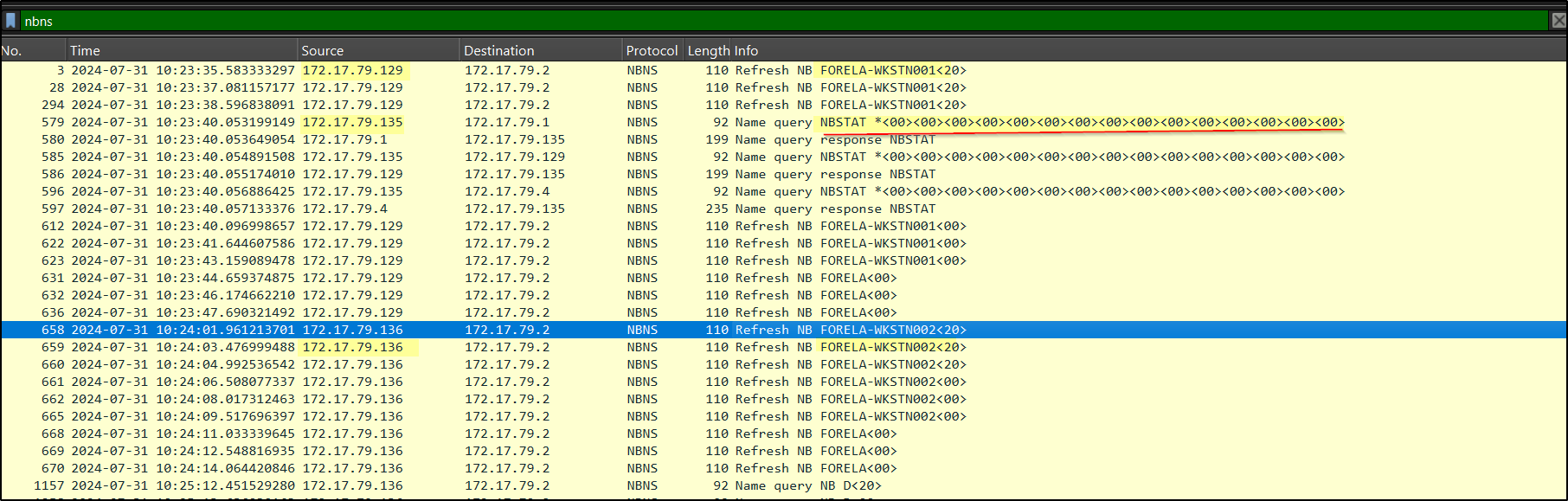
We can see two IPs resolving to these hostnames:
172.17.79.129 → FORELA-WKSTN001
172.17.79.136 → FORELA-WKSTN002
There is a suspicious query from 172.17.79.135, which looks like manual enumeration (similar to running a command like nbtstat -A 172.17.79.4 to get host information). Tools like nbtscan or nmap also use this method to discover systems and their roles.
Also, 172.17.79.135 is responding to queries and resolving the hostname D for 172.17.79.136 – likely Netbios spoofing

In addition, multiple ARP requests from 172.17.79.135 show sequential “who has” queries, which indicates an ARP scan for host discovery. 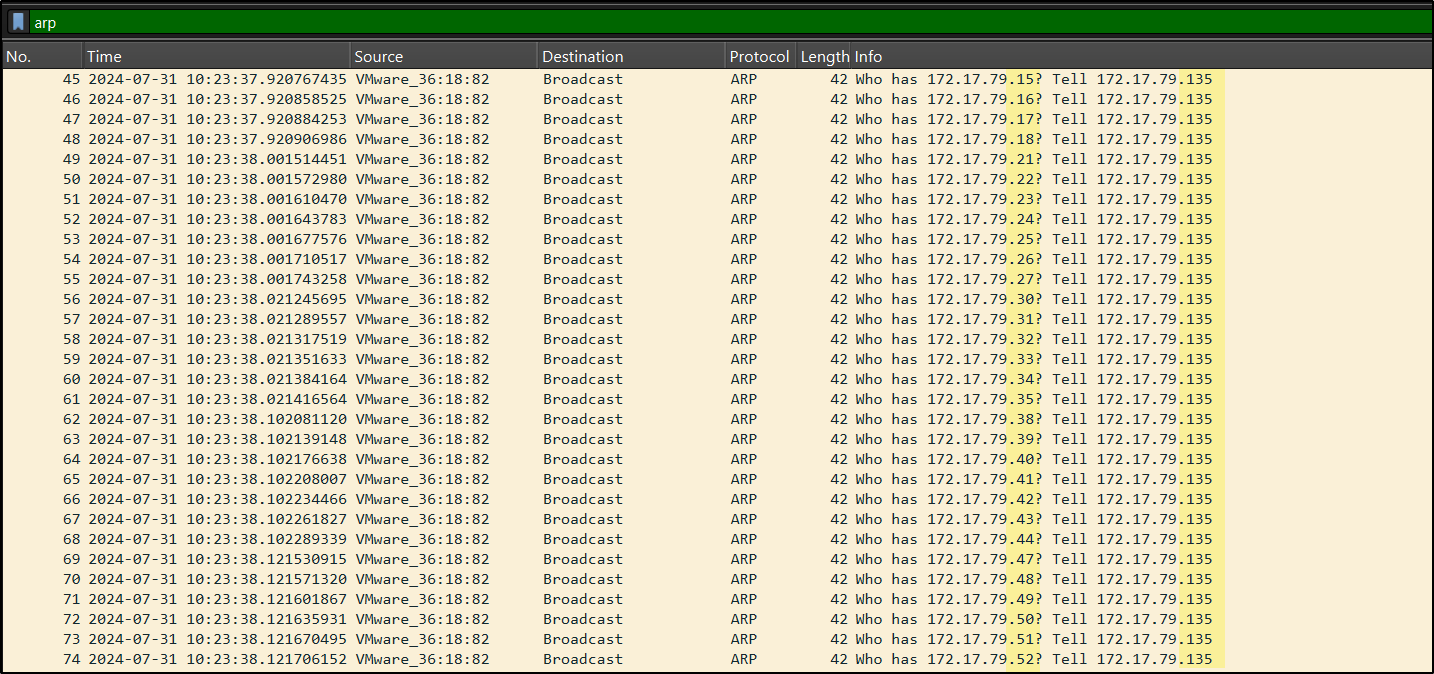
It indicates that the host 172.17.79.135 is compromised and from this machine the attacker is performing further actions like scanning and poisoning.
SMB2 Authentication & Relay Analysis
Now that we identified the attacker, let’s check if any NTLM authentication is happening. Apply filter ntlmssp. 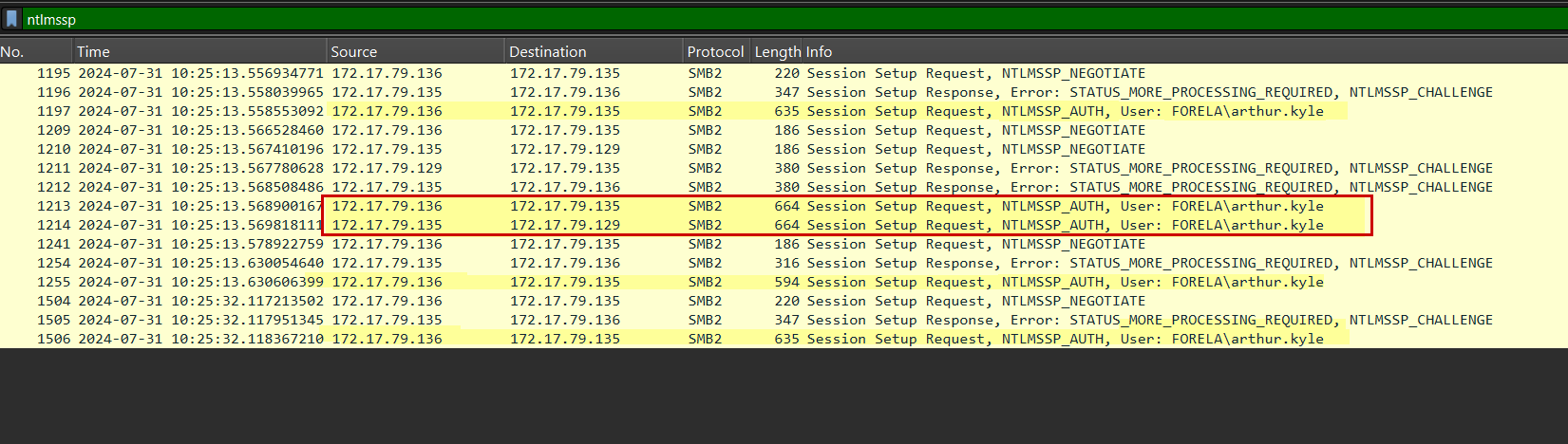
1
Session Setup Request, NTLMSSP_AUTH, User: FORELA\arthur.kyle
This shows that 172.17.79.136 is sending NTLM authentication (hash) to the attacker 172.17.79.135. which means the user
arthur.kylefromFORELA-WKSTN001 (172.17.79.136)is repeatedly sending credentialsAt the same time, the attacker is relaying these credentials to Host 172.17.79.129.
Dive into Conversations
if we filter the conversation between these 2 hosts ip.addr eq 172.17.79.135 and ip.addr eq 172.17.79.136 it is observed that 136 is queryed fileshare D instead of \\DC01\Trip which we can confirm in Later queries by 172.17.79.136 which are correctly resolved by 172.17.79.4
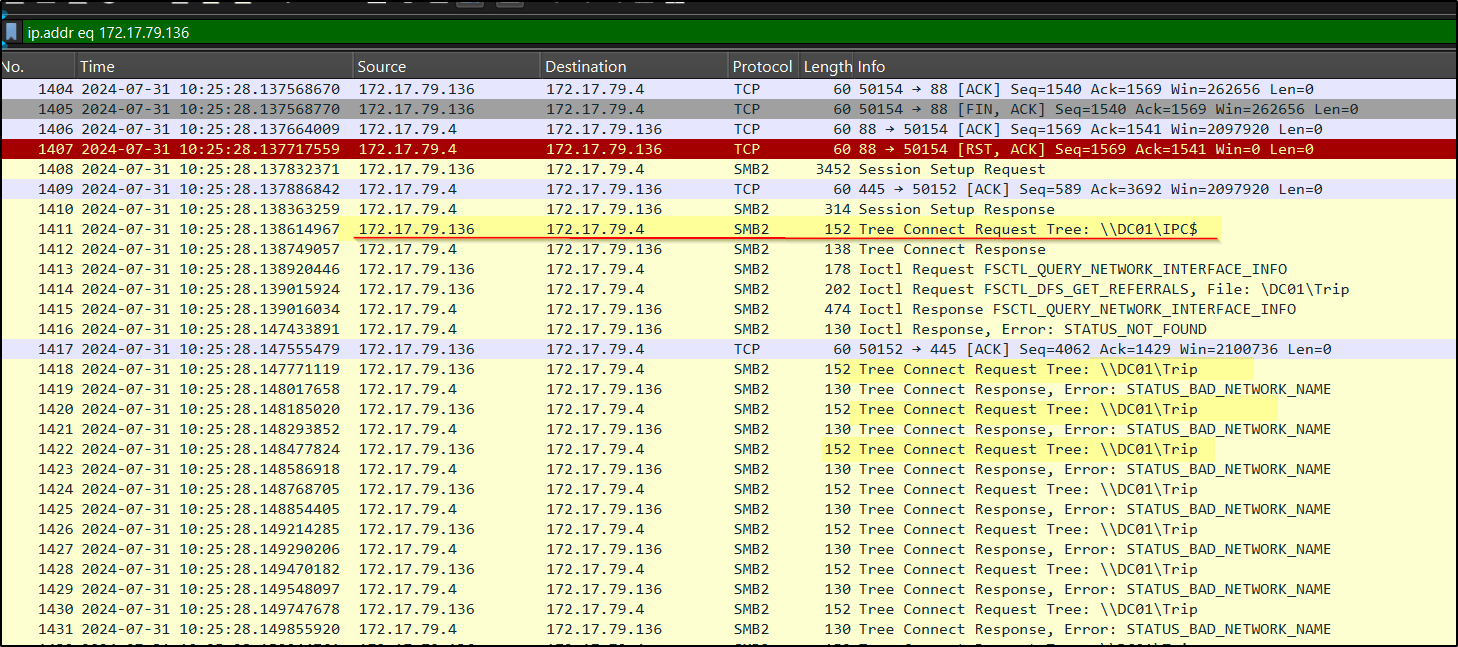
now lets filter ip.addr eq 172.17.79.135 and ip.addr eq 172.17.79.129 to see what happend after he relayed the credentials of arthur.kyle user
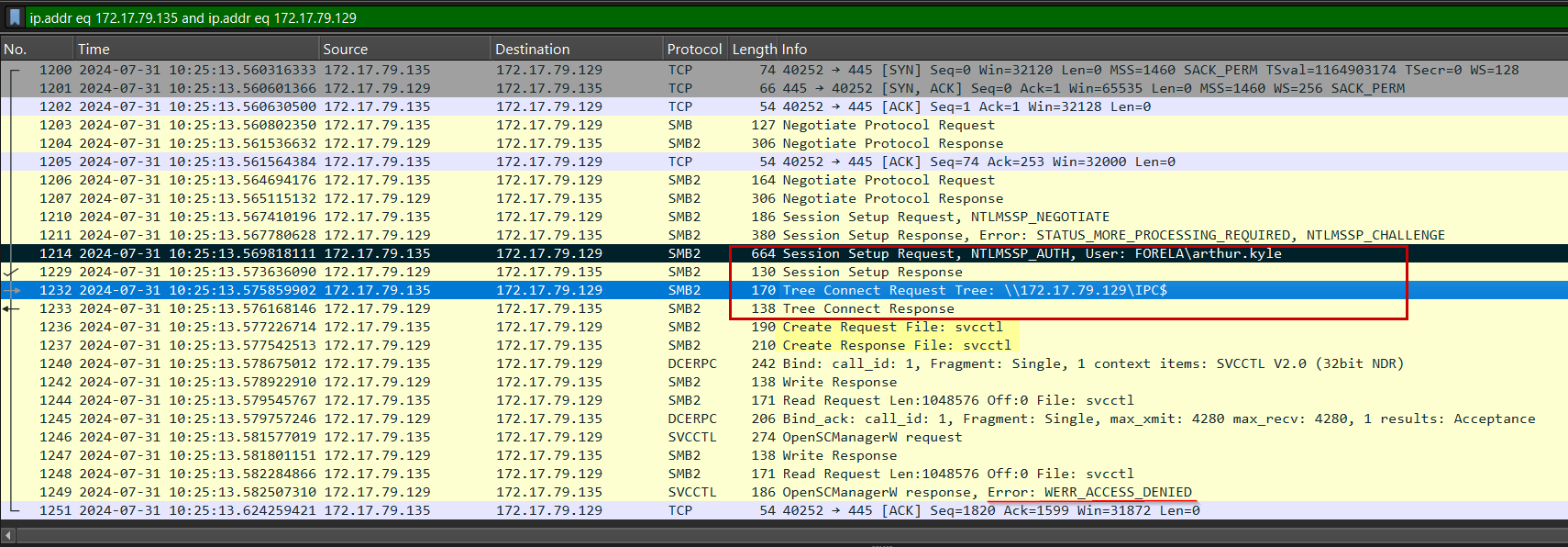
The SMB traffic shows a successful NTLM authentication for the user arthur.kyle, as indicated by the Session Setup Response without any error. Following this, the IPC$ share is accessed, confirming that the login was successful.
The attacker then attempts to interact with the Service Control Manager (svcctl) for remote execution, but receives an “Access Denied” response, indicating that the compromised account does not have administrative privileges.
Confirming Unauthorized Access
Now let’s check if the attacker logged in as user FORELA\arthur.kyle on host
FORELA-WKSTN002. Even if the relay failed, the attacker captured NTLM hashes multiple times, and if the password is weak it can be cracked using tools like john or hashcat. If cracking is successful, the attacker can log in.
In the given security logs, filter Event ID 4624 for successful logins and search using the attacker IP 172.17.79.135 We can see one event showing a successful login and another showing access to a network share (IPC$).
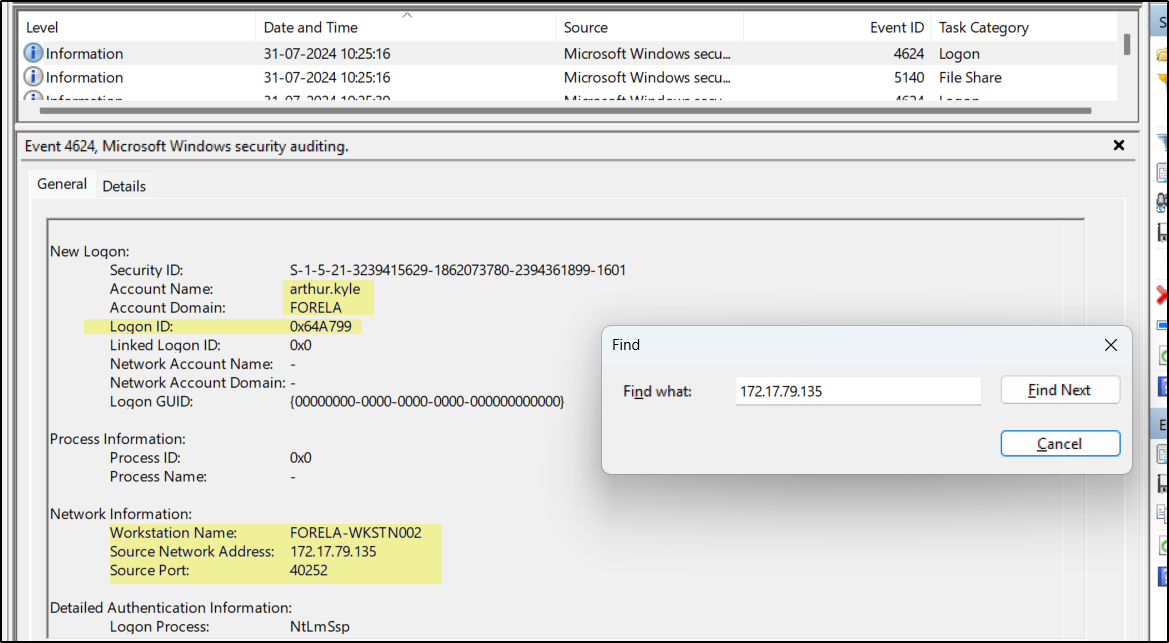
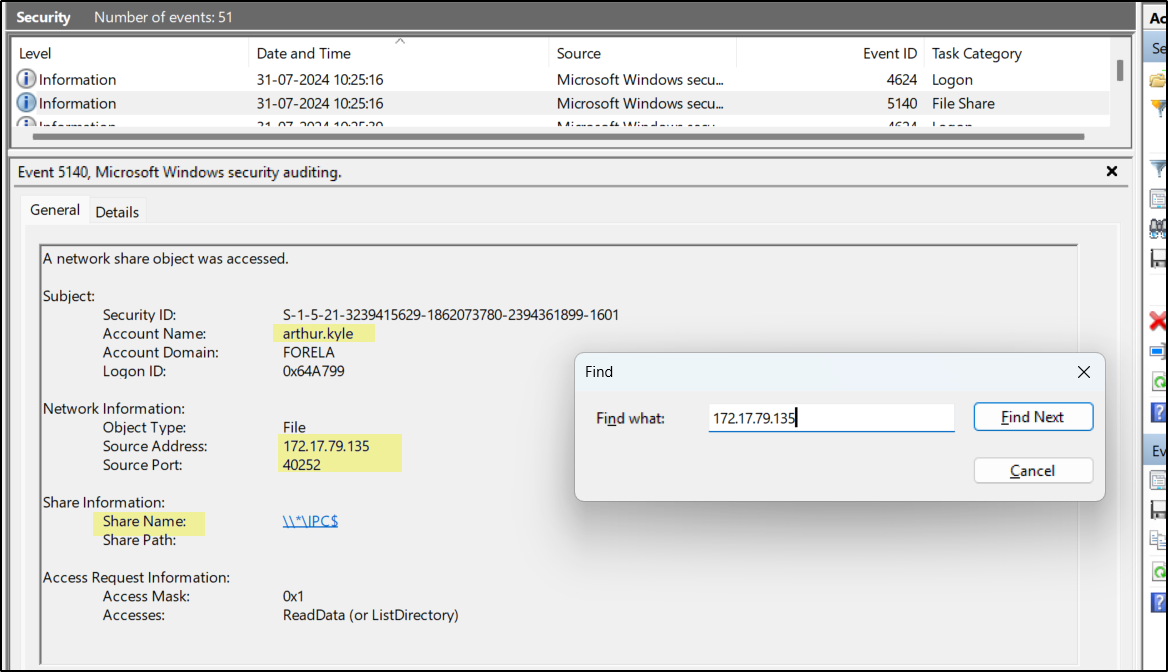
When analyzing these logs, the IP address shows where the login originated, the workstation name helps identify any mismatch (indicating possible compromise), and logon type 3 confirms it is a network-based login. For correlation, IP address and Logon ID can be used to link the login event with the corresponding share access event.
We see how a small typo can lead to host compromise. The attacker sits in the middle (MITM), spoofs hostnames, captures NTLM hashes, and uses them to log in or relay the authentication to other systems.